Rendering variants within SXA allow you to define your own html structures that will render your field values. You can use multiple variants to render the exact same content in a completely different way. In this post I will not explain how to use rendering variants or build your own. There are a lot of posts and excellent documentation that you can read to learn that.
Instead I want to share something that isn't documented but can be very helpful when defining your own variants.
Let's have a look at the default rendering variant for a promo. It shows a image, title and a link.

But what if we wanted to show the image as a background for the title and the link. We can do that by applying some CSS and do some positioning, but that's not really how we prefer to do that. Instead we would like to use the image as a background image.
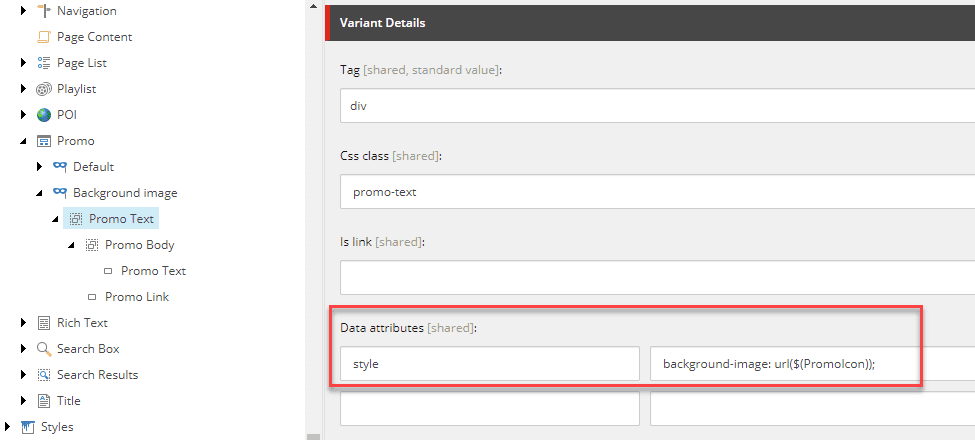
The way to do that is to use tokens within the data attributes of a variant field. In our case we want to define a style element on our div element which will
contain the background-image.
In the data attributes we set style as the key and for the value we will use "background-image: url($(PromoImage)". SXA will then replace the $(PromoImage) with
the url to the media item.
As a final result we can now see that our image is being rendered as a background image. Therefore we don't need complex CSS to put the text in front of the image.
Use the $(fieldName) notation to render field values as data attributes

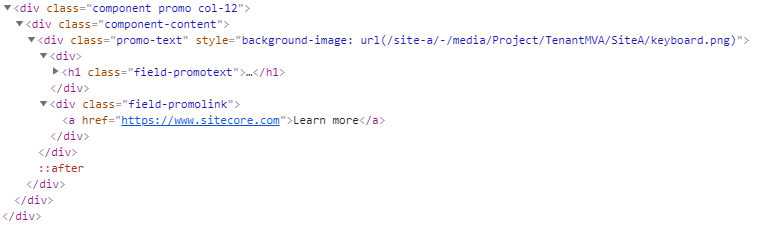
And the HTML which shows that our background image url is resolved and defined in the div element.
Additional update
Read this post by Sitecore MVP Gert Gullentops if you want to learn how to extend this functionality to include values from lookup fields.
Thanks Gert for the tip and blog post!